

Cart
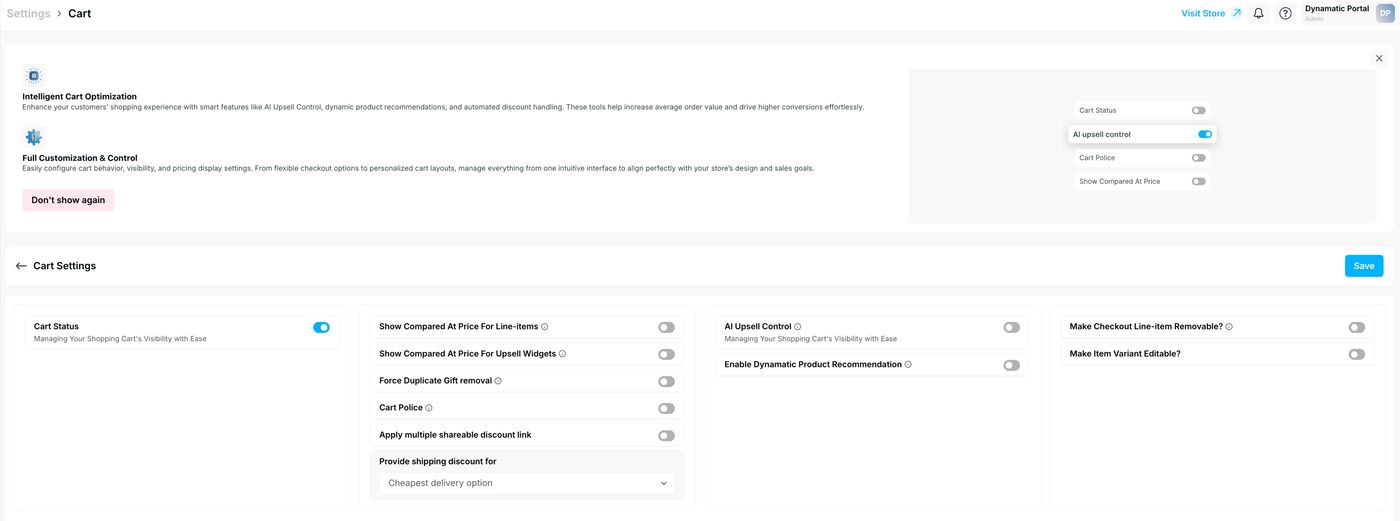
The Cart Settings page (located under Settings > Cart) allows merchants to manage shopping cart visibility, pricing displays, and AI-driven conversion tools.
Optimization & Customization
The interface features two primary focus areas:
Intelligent Cart Optimization: Enhances the shopping experience with features like AI Upsell Control, dynamic product recommendations, and automated discount handling to drive higher conversions and increase Average Order Value (AOV).
Full Customization & Control: Allows for the configuration of cart behavior, visibility, and pricing display settings to align with your store's design and sales goals.
Core Cart Settings
Cart Status
Toggle: Enables or disables the shopping cart's visibility to customers.
Description: Use this to manage your shopping cart’s presence on your storefront with ease.
Pricing and Logic
Show Compared At Price For Line-items: Displays the original price alongside the discounted price for items already in the cart.
Show Compared At Price For Upsell Widgets: Shows "strikethrough" pricing for recommended items in upsell sections.
Force Duplicate Gift removal: Automatically removes duplicate promotional gifts from the cart.
Cart Police: A setting to enforce specific cart rules or constraints.
Apply multiple shareable discount link: Enables the application of multiple discounts via shareable links.
Shipping Discount Configuration
The Provide shipping discount for dropdown allows you to specify exactly how shipping discounts are applied:
All delivery options: Applies the discount to every available shipping method.
Specific delivery options: Allows for targeted discounting of certain methods.
Cheapest delivery option: Automatically applies the discount to the lowest-cost shipping method (Default).
Delivery option name: Discounts based on the specific name of the delivery service.
Delivery option cost: Discounts based on a specific cost threshold.
No Discount (Show UI only): Displays the shipping UI without applying a monetary discount.
AI & Product Recommendations
AI Upsell Control: Enables the automated system for managing upsell visibility and offers.
Enable Dynamatic Product Recommendation: Turns on dynamic suggestions to show customers relevant products based on their current cart contents.
Line-Item Interaction
These settings define how customers interact with individual items before checkout:
Make Checkout Line-item Removable?: If enabled, customers can delete items from the list during the final checkout stage.
Make Item Variant Editable?: Allows customers to change product variants (e.g., size or color) directly within the cart interface.
Finalizing Settings
Note: Any changes made to these toggles or dropdowns will not take effect until you click the blue Save button located at the top right of the Cart Settings section.
Would you like me to help you create a troubleshooting guide for common cart display issues related to these settings?