

Product Feeds
A Product Feed is a collection of products grouped together using either manual selection or advanced rule-based logic. These feeds are then assigned to dynamic widgets—such as the List Widget or Slideout Upsell—to determine exactly which products a customer sees.
Configuration Breakdown
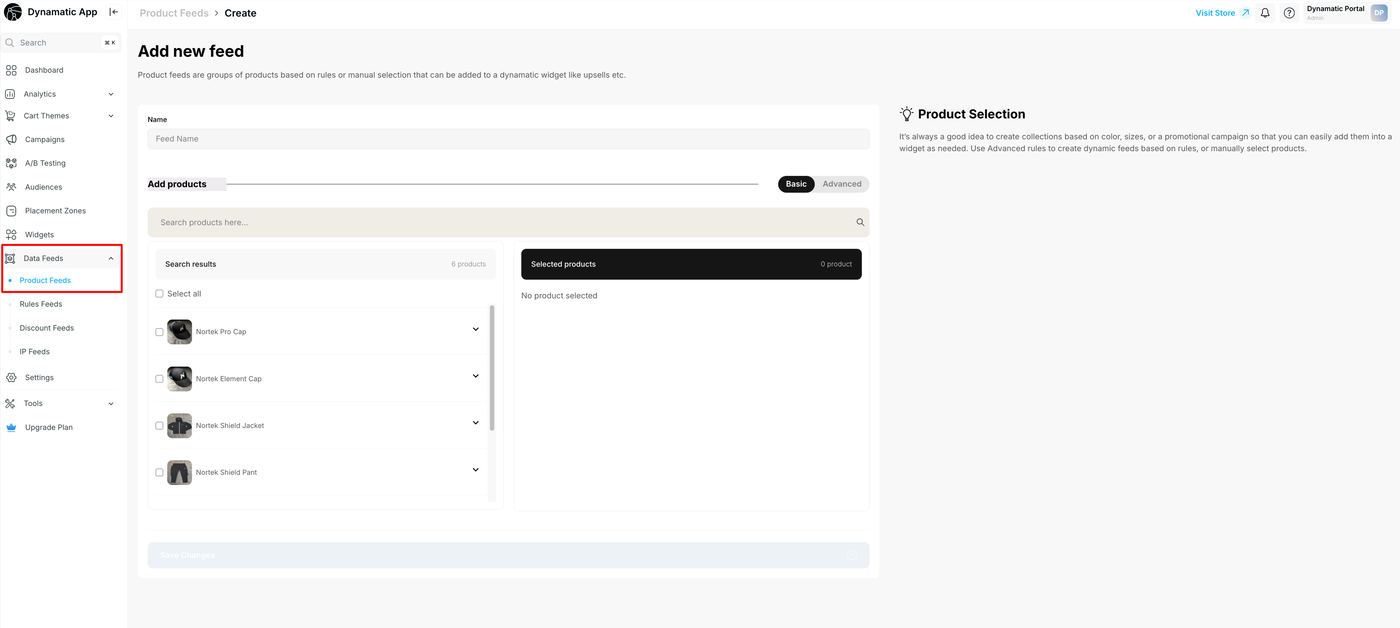
1. Basic Setup (Manual Selection)
The Basic tab allows for straightforward product curation:
Search and Select: Use the internal search bar to find products from your Shopify catalog.
Individual Selection: Toggle specific products to add them to the "Selected Products" list on the right.
Bulk Selection: Use the "Select All" feature to quickly group entire search results.
2. Advanced Rules (Dynamic Logic)
The Advanced tab transforms your feed into an automated engine that updates itself based on your Shopify data9999:
Logical Operators: Use "IF" statements combined with "AND/OR" logic to create highly specific product groups.
Filter Criteria: You can build rules based on a wide array of product attributes, including:
Collection: Include products from specific categories (e.g., "Men's Footwear").
Product Tags: Target items with specific tags like "Best Seller" or "Summer Sale".
Inventory Levels: Only show items where stock is greater than a specific threshold (e.g., Inventory > 300).
Price Points: Group products by value (e.g., Price < $50).
Technical Identifiers: Use SKU, partial SKU, or Metafields to group highly specific technical variations.
3. Feed Management
Naming: Every feed requires a unique name (e.g., "Accessories for all Men's Footwear") to make it easily identifiable when configuring widgets later.
Matched Products Preview: The right-hand panel provides a real-time preview of which products currently meet your advanced rules, ensuring your logic is functioning as intended before you save.
Why This Matters for Your Store
Efficiency: Update one feed (like "Sale Items"), and every widget using that feed updates automatically.
Relevancy: Ensure you are only upselling products that are actually in stock or relevant to the customer's current collection.
Personalization: Create specific feeds for different segments (e.g., a "VIP Collection" feed) to show exclusive products to your high-value audiences.