

Purchase Limiter
The Purchase Limiter allows you to set specific per-product restrictions to prevent bulk buying, protect your inventory, and ensure all customers have fair access to your products. By implementing simple rules, you can manage stock levels effectively and create a sense of exclusivity around high-demand items.
Playbook
The Purchase Limiter allows merchants to set strict restrictions on the quantity of specific products or variants a customer can purchase, preventing bulk-buying and ensuring fair inventory distribution.
"Fair Shopping. Smarter Inventory. Protect your high-demand stock from scalpers and ensure every customer gets a fair shot at your best deals with simple, automated quantity rules."
The "Why" & The Metrics
Primary Metric Impact: Average Order Value (AOV) stability, Inventory Turnover Rate, and Customer Satisfaction scores.
The Psychological Trigger: Scarcity & Exclusivity. Limiting purchases can increase perceived product desirability by up to 17% by signaling high demand4.
Best Fit Industries: Fashion (limited drops), Electronics (high-demand hardware), Food & Beverage (limited batches), and Health & Wellness.
Strategic Use Cases (The "Plays")
Play #1: The Fair-Play Activation (Quick Win)
The Concept: Prevent single users from clearing out promotional stock.
The Logic: Essential for first-time visitors during a major sale to ensure a positive brand experience for the widest possible audience.
Configuration Strategy:
Trigger/Condition: All users6.
Key Setting: Set a hard "Limit Count" (e.g., 1 or 2) for promotional SKUs.
Copy/Creative Idea: "Limit 2 per customer to ensure everyone gets a taste!"
Play #2: The Inventory Protector (Profit Maximizer)
The Concept: Protect high-margin, low-stock items from bulk resellers.
The Logic: By inhibiting suspicious bulk behavior, you secure your store financially and keep stock available for higher-value, long-term customers.
Configuration Strategy:
Trigger/Condition: Specific high-demand collections.
Key Setting: Use "Exclude Products" to allow unlimited buying on bulk-heavy items like accessories while restricting core hardware.
Copy/Creative Idea: "Exclusive release: limited quantities available to protect our community."
Play #3: The Tiered Access Builder (Brand Builder)
The Concept: Offer higher limits to loyal segments while keeping strict limits for the general public.
The Logic: Rewards your most valuable customers (VIPs) with greater access, reducing friction for them while maintaining control over general traffic8.
Configuration Strategy:
Trigger/Condition: Targeted Audience (e.g., "VIP" tag)9999.
Key Setting: Set a higher "Limit Count" for the VIP segment compared to the "Default" audience.
Copy/Creative Idea: "VIP Perk: Your limit has been increased to 5 items!"
Pro-Tips & Constraints
Smart Constraint: Remember that limits can be applied based on customer tags. Retail customers might have a limit of 1, while wholesale customers could be unrestricted.
Integration Note: The Purchase Limiter works in real-time with the Dynamatic Cart to intercept "Add to Cart" actions before they hit the server.
Optimization Tip: Monitor your Analytics to see if specific limits are causing cart abandonment. If a limit is too strict, you may be leaving revenue on the table19.
Why Use the Purchase Limiter?
Prevent Overselling & Protect Inventory: Setting maximum quantities significantly reduces the risk of overselling during demand spikes and prevents unintentional disclosure of total stock levels.
Ensure Fair Access: Limits curb hoarding and reselling, ensuring that promotional or limited-release items are available to a wider group of customers rather than a few bulk buyers.
Enhance Marketing Strategy: Shoppers are driven by scarcity; products with purchase limits are often perceived as approximately 17% more desirable than those without.
Improve Forecasting: Predictable stock levels through enforced limits lead to smoother inventory turnover and more efficient fulfillment planning.
Secure Your Store: Restrictions help inhibit suspicious behavior, such as fraudulent bulk orders, protecting your store financially.
Advanced Restriction Strategies: Some configurations allow for re-purchase limits, tracking cumulative customer buys across weeks or months rather than just single orders.
How to Configure the Purchase Limiter
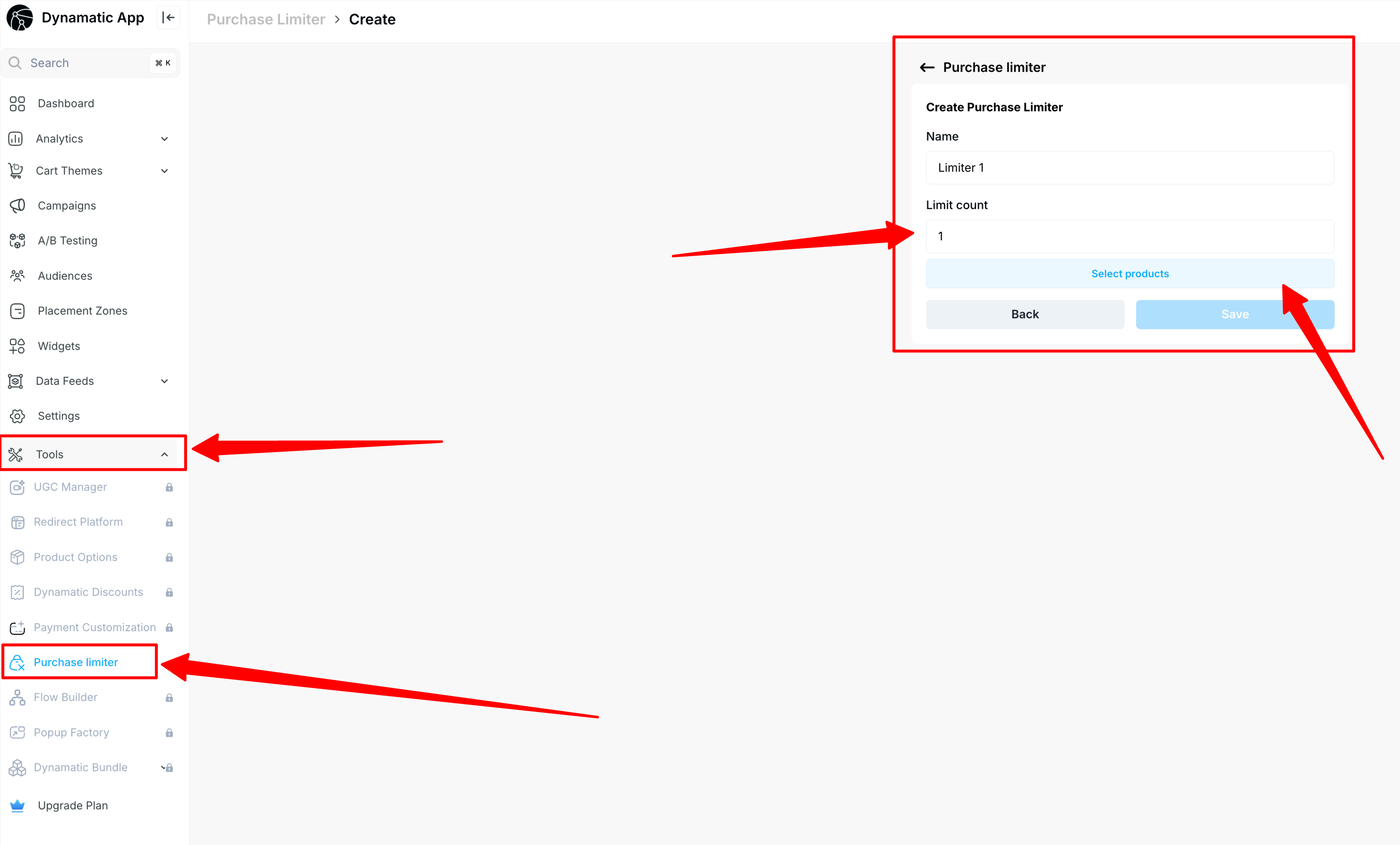
Setting up a Purchase Limiter follows the standard Dynamatic widget creation workflow.
Access Tools: From your Dynamatic dashboard, click on Tools and select Purchase Limiter.
Configure Purchase limiter:
Name: Give your specific limiter a unique internal name.
Limit Count: Enter the maximum number of units a customer is allowed to purchase.
Target Products: Click Update products to select the specific SKUs or variants you wish to restrict. The selected items will appear in a list showing their image, title, and price.
Save Changes: Review your settings and click Save to finalize the limiter.
Frequently Asked Questions
What is a purchase limiter ? It allows merchants to set quantity restrictions per order, per day, or over a specific period to manage inventory and ensure fair distribution.
Why should I use a purchase limiter? It prevents scalping, manages inventory more effectively, and creates urgency/exclusivity around popular items.
Can I set different limits for different products or collections? Yes. You can set specific limits for individual products, variants, or entire collections.
Can I apply purchase limits to specific customers or groups? Yes. Limits can be applied based on Customer Tags. For example, you can set stricter limits for retail shoppers while allowing higher limits for wholesale segments.